Accessible with bit.ly/frozen-soft and thanks for visiting | Please don't skip onto the direct link, whereupon use the ADF.LY/J.GS links, that really helps and means a lot to me | If you're using Chrome Browser, you can type frozen-soft.blogspot.com then press SPACE to search


You're on: Editor
Showing posts with label Editor. Show all posts

Thursday, March 13, 2014

Topaz DeJPEG

Topaz DeJPEG gives you the ability to improve the quality of your JPEG images. DeJPEG eliminates JPEG compression artifacts, which occur as a result of saving an image in the JPEG format, allowing your image detail and color to be restored.

       DeJPEG's underlying algorithm examines the entire image and removes all artifacts while preserving detail and enhancing an image's natural qualities. It targets all aspects of JPEG quality including sharpness, noise, and color integrity. The sophisticated tools in Topaz DeJPEG ensure that any processed JPEG image appears clear, clean, and crisp. Topaz DeJPEG is simply the best way to make the most out of your compressed JPEG photos

WHAT ARE JPEG ARTIFACTS?
ARTIFACT EXAMPLE
JPEG photos often have many problems, displayed in the pink graphic to the right. Notice the mosquito noise around the edges, the image "checkerboarding" in the middle, and the color degradation. Every single JPEG image exhibits these characteristics to some degree.

Topaz DeJPEG is designed to remove these artifacts without removing image detail. In fact, Topaz DeJPEG is the theoretically optimal way to eliminate these compression artifacts.

KEY FEATURES
  • Ability to restore color and detail to image features
  • Intelligent color and line enhancement
  • Preserves image integrity
  • Eliminates typical jpeg image distortions that degrade image quality
OPTIMAL HIGH QUALITY RESULTS
Use DeJPEG to ensure that any batch of high-quality JPEGs look just as good as if they were shot it in RAW

PERFECT FOR WEB-READY IMAGES
Designers who work with web images find DeJPEG invaluable for rescuing otherwise unusable pieces of stock photography

SHARPEN COLOR EDGES
One of the most popular uses of DeJPEG is to counteract unwanted color "bleeding" and information loss that occurs even in high-quality JPEG images. Topaz DeJPEG's color sharpening and edge restoration tools actually reconstruct softened color edges, bringing out previously unseen image details and restoring sharpness to damaged edges. This is highly useful in many Photoshop tasks like masking and also makes the image look much cleaner in general

TURNS LOW-QUALITY SHOTS INTO HIGH QUALITY ONES
Point and shoot and camera phone users take advantage of DeJPEG's extensive artifact reduction capabilities to enhance the quality of their snapshots

DOWNLOAD
TOPAZ DeJPEG
TOPAZLABS - 23.2 MB

KEY

Posted By Unknown 3/13/2014

Friday, January 3, 2014

Apowersoft Video Editor

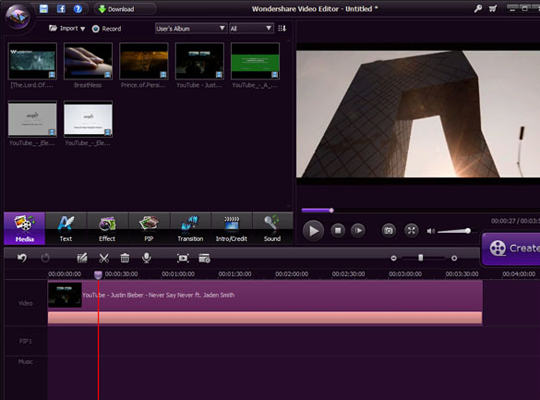
Create your own professional videos and movie clips, or create TV shows and entertaining home movies with video you recorded, shot or downloaded. Apowersoft highly recommends this exceptionally easy-to-use video editing software.

Unlike other complicated video editing software, this smart video editor is designed for beginners to make magic video clips in just a few minutes. Videos created with this tool can be used for teaching, presentation, sharing and just plain fun. You can import any videos shot by all types of digital cameras, camcorders, mobile devices, etc., video recorded by other screen recorders and webcams, or video you downloaded from internet. Then combine these video clips with your own music, pictures and audio for fantastic results!

CREATE YOUR OWN PRO VIDEO (EASY AND SIMPLE TO USE)
Don't suffer with complicated video editing software! With this video editor, you can easily create enjoyable and professional videos, movies, slideshows, demos and presentations. Everything operates from one window, and allows you to access all functions with one-click. Drag and drop files from your desktop to easily add media, video, audio and music, as well as the transitions, effects, text, etc.
Totally customize the frame rates while overlapping video/audio/text by scrolling to stretch/shrink each file

IMPORT VIDEO FROM VARIOUS DEVICES AND FORMATS
Capture video from DV cameras, vidicons, webcams, cell phones, or import any video file format like AVI, MP4, WMV, MKV, and others from your PC disk. You can even record and add audio directly through your microphone with this video editing app

NUMEROUS EFFECTS HELP YOU MAKE STUNNING VIDEO
  • There are 250+ fantastic audio/visual effects, including filters, improved text effects, transitions and classic sound effects to help you add special features to your movie or slideshow. Combine images, music, and video clips with all kinds of captions and transitions.
  • Choose from 60 classic and creative visual effects to apply color and motion filters to your video.
  • This video editor also includes 50 special dynamic transitions like blind, cross shutter, cross merge, round zoom, roll, etc
Lots and lots of effects available
You can also change the video color, speed, crop, etc
Transitions to change from video A to video B, and etc with effect
SPECIAL EDITING FEATURES FOR YOUR VIDEO
  • Speed up or slow down video playback with 0.5, 1.5 or 2x compared to your original video. This will make your video easy to understand and add funny effects.
  • Create Picture-in-Picture video and play several video clips in one video. You can put many movies into one frame to tell different stories.
  • Mute video or extract audio from your video and adjust it separately in the same workspace. You can edit the audio for speed, volume and more.
  • Mosaic part of your video to hide important information, or details you don't want viewers to see. You can even hide your face and replace it with a funny mask.
Every sections are divided with the section
You can also crop the video
CREATE AND SHARE VIDEO WITH ANYONE
  • After you finish editing videos, you can create and share your video masterpieces with all your family and friends.
  • Burn videos to DVD as a gift and send to your family member, or watch videos later on your DVD player.
  • Convert video to standard or HD video. There are many output formats and profiles from which to choose.
  • Video you create will be compatible with iOS & Android and many others like iPhone, iPad, Samsung and HTC.
  • Directly upload your video to YouTube and other video sharing sites.
DOWNLOAD
APOWERSOFT VIDEO EDITOR FREE (LATEST)
ORIGINAL (DIRECT LINK)

Posted By Unknown 1/03/2014

Friday, July 26, 2013

SureThing Disc Labeler Deluxe GOLD 6.0.34.0

SURETHING NAVIGATOR
SureThing Navigator is your new control center for all things SureThing. Navigator lets you get started fast, providing you with links to your most recently worked on projects, create new projects, browse the Design Cloud, inform you of new updates, and much more. No more blank screen when you close your project, now you’re just a mouse click away from your next SureThing activity!

DESIGN CLOUD
Design Cloud connects you to SureThing.Com, letting you browse and add design elements to your projects, directly from within Disc Labeler. Looking for new project designs? Go to the cloud. Looking for new backgrounds or clipart? Go to the cloud. Let us know what you’re looking for, we’re building it all with you in mind!

TURBO-CHARGED GRAPHICS
Digital cameras and SmartPhones have caused an explosion in the size of digital photos. No worries, Disc Labeler has retooled its graphics engine to provide quick response times when loading, manipulating, and printing images of all kinds. 12 mega-pixel photos, no problem! SureThing is there when you need it

TRUE DROP SHADOWS
Give your text a new, rich look with true soft shadows. Seamlessly blends your text with whatever is behind it. Text over images and colors never looked so good!

DRESS TO IMPRESS
Beautiful CD label and cover designs are at your fingertips! Easily coordinate your label and case insert designs, all within a single project. Create your own designs or let our SmartDesigns jump start your project. You can even select one of our professionally designed templates to find the right fit for your project. No matter how you slice it, impressive results are on the way!

USE ANY BRAND OF DISC LABELS
With most CD labelers, you are forced to use their exclusive brand of labels. Not with SureThing Deluxe! We have over 80 different cd label templates alone, including all the most popular brands. With our Template Creator, you can design your own. Of course, once you try SureThing SuperVibrant Labels, you'll never want to change

DIRECT-TO-DISC PRINTING
Many inkjet printers support printing directly to CDs and DVDs. SureThing provides state-of-the-art support for direct-to-disc printing. Never fiddle with complicated driver settings again, let SureThing do the heavy lifting for you. Then, sit back and enjoy consistent full color discs with silk screen like quality

WORLD CLASS LIGHTSCRIBE SUPPORT
SureThing Disc Labeler was the first certified LightScribe disc labeler, and continues to be the leader in providing the most extensive LightScribe support available. True WYSIWYG support for colored LightScribe discs lets you see your designs on screen the same way they will look when printed. Our background print manager frees you to do other things while LightScribe burns your designs

THOUSANDS OF IMAGES
SureThing Disc Labeler Deluxe provides you with access to up to thousands of background and clipart images to give your designs the distinctive look perfect for your project. Or drop in your own photos and logos to create even more personalized designs. Coupled with our new turbo-charged graphics engine, working with images has never been easier

TARGET PRINTING
More than just design software, successful label printing means hitting the label directly on target every time. SureThing has the experience, expertise and technology to ensure the most accurate label printing possible. SureThing's precision is unmatched in the industry

SYSTEM REQUIREMENTS
* Windows 8, Windows 7, Windows Vista, Windows XP
* 1GB of memory, 2GB recommended for Windows 7, 8 or Vista
* 200MB of Available disk space
* 800x600 monitor resolution, 1024x768 recommended
* Windows compatible laser or inkjet printer

DOWNLOAD
v 6.0.34.0 - MAGNET
by [ChingLiu]

Posted By Unknown 7/26/2013

Wednesday, May 29, 2013

Corel PaintShop PRO X5


COREL Paint Shop Pro Photo X5 has everything you need to create stunning photos. The integrated Learning Center and a selection of one-click photo-fixing tools make it easy to correct common photo flaws such as red eye, color and sharpness. Unique makeover tools let you whiten teeth, remove blemishes and paint on a tan, so you can make everyone look their best before printing or posting photos online.

As your skills and confidence grow, you can harness the power of professional-
quality features such as HDR Photo Merge, Histogram, Curves and Levels Adjustment tools to make precision edits. You can even get creative with artistic effects and filters to turn your favorite photos into fun projects to share with family and friends.

Paint Shop Pro Photo, a part of the Paint Shop family of digital imaging and 
photography products, is the most complete, easy-to-use software for creating 
professional digital imaging results. By combining automatic and precision tools with an integrated learning system, Paint Shop Pro Photo helps you produce professional results with power and ease. Filled with one-of-a-kind photo tools sure to please even the most discerning photographer, Corel Paint Shop Pro Photo is the ideal choice for people who want extraordinary photos.

In an exploding digital imaging market, Paint Shop Pro Photo rises above the rest. With the unparalleled power of Automated Productivity Scripts and Dynamic Personalization, Paint Shop Pro Photo increases productivity and enhances workflow like no other digital imaging software on the market. Paint Shop Pro Photo is your complete solution for print and Web.

Give your photos the professional look they deserve with automatic photo fixes and precision editing tools for fine-tuning. When you need help, the built-in Learning Centre is there to make it easier. Paint Shop Pro Photo delivers a complete set of 
photo editing tools to help you create professional-looking photos fast! By 
combining automatic photo fixes and precision editing controls with a revolutionary 
Learning Center, Paint Shop Pro Photo is an easy-to-use photo editor for anyone who 
wants stunning photos.

If creating great pictures is your passion, Corel PaintShop Photo Pro X5 is the 
photo-editing program for you. Featuring a brand-new RAW Lab and easy batch photo 
processing, it's the only advanced photo-editing software to combine photo 
management, creative projects, photo sharing and even HD video slideshows in one 
package. It's everything you need to get professional-looking results you'll be 
proud to share. Ideal for DSLR cameras!

PaintShop Photo Pro X5 is the most rewarding way to enhance your photos and create professional-looking images. Now with a complete RAW workflow, this photo-editing program lets you manage, adjust, edit and share your digital photos all in one place. Accelerate the way you organize, rate, tag and sort with new photo management tools. Make automatic fixes in the enhanced Express Lab, or go deep with a full set of advanced editing tools. Then upload to Flickr, Facebook and You-Tube, create high-quality photo books and projects, print, email or back up photos on disc. It's your entire photo workflow in one high-performance package.

Corel PaintShop Photo Pro X5 gives you the power to easily organize, edit and share professional-quality photos fast. Ideal for DSLR cameras, it combines photo organization, easy batch processing, creative projects, sharing, and now HD video slideshows and a new RAW Lab.

FEATURES
- RAW Lab - manually adjust groups of RAW photos during the loading process

- Enhanced! Express Lab - quickly fix common flaws in this speed-editing mode

- Advanced editing tools - edit fast with Smart Carver, Vibrancy and more

- HD photo and video - import and export HD video

- Integrated projects - create photo books, HD slideshows, cards and more

- Enhanced! Photo sharing - email, print online or at home, and send directly to Facebook,and Flickr

Organize and manage all of your photos fast!
- Edit fast with advanced editing tools, including new Smart Carver
- Fix common problems fast in the Express Lab
- Edit one photo, then apply the changes to many others at once
- Import, make basic edits and export HD video
- Create photo books, HD slideshows, cards and more
- Print, burn to disc, send directly to Facebook, Flickr and

SYSTEM REQUIREMENTS
 * Microsoft Windows 8, Windows 7, Windows Vista or Windows XP with the latest service packs installed (32-bit or 64-bit editions)
 * Intel Pentium 4 or AMD Athlon 64 or later (multi-core processor recommended)
 * 1.5 GB RAM (2 GB or higher recommended)
 * 1 GB of available hard-disk space required (2 GB or greater recommended)
 * 1024 x 768 16-bit color display (24-bit recommended)
 * DirectX 9 or higher
 * Internet connection required for online features and tutorial videos

 * Windows compatible CD/DVD drive for installation

DOWNLOAD

MAGNET LINK [TinyPaste]

Posted By Unknown 5/29/2013

Adobe Photoshop CS6 Extended Edition


PRODUCTS AVAILABLE
Adobe Photoshop CS6 Extended                   
Adobe Device Central CS6
Adobe Extended Script Toolkit CS6                 
Adobe Extension Manager CS6
Adobe Fonts CS6
Adobe Bridge CS6

SYSTEM REQUIREMENTS

•Intel® Pentium® 4 or AMD Athlon® 64 processor
•Microsoft® Windows® XP* with Service Pack 3 or Windows 7 with Service Pack 1
•1GB of RAM
•1GB of available hard-disk space for installation; additional free space required during installation (cannot install on removable flash storage devices)
•1024x768 display (1280x800 recommended) with 16-bit color and 512MB of VRAM
•OpenGL 2.0–capable system
•DVD-ROM drive
•This software will not operate without activation. Broadband Internet connection and registration are required for software activation, validation of subscriptions, and access to online services.† Phone activation is not available.

3D features and some GPU-enabled features are not supported on Win XP

CHANGELOG (v13.0.1):

* The Adobe Photoshop 13.0.1 update includes many critical fixes improving security, stability and performance while also addressing a number of high priority bugs with 3D, Crop, Type, Painting, Paths, and Shapes..

* Arabic and Hebrew supported in a Middle Eastern version with full right-to-left language support, Arab/Hebrew features, and an English interface; also in a North African French (Francais*) version with full right-to-left language support, Arab/Hebrew features, and a French interface.

LANGUAGES

Dansk, Deutsch, English, Español, Français, Français*, Hebrew*, Hungarian, Italiano, Nederlands, Norwegian, Polish, Português (Brasil), Suomi, Svenska, Turkish, Ukrainian, ceština, عربي*, 日本語, 简体中文, 繁體中文, 한국어

DOWNLOAD


MAGNET LINK [TinyPaste]

Posted By Unknown 5/29/2013

 
Claim Free Satoshis Now!