Accessible with bit.ly/frozen-soft and thanks for visiting | Please don't skip onto the direct link, whereupon use the ADF.LY/J.GS links, that really helps and means a lot to me | If you're using Chrome Browser, you can type frozen-soft.blogspot.com then press SPACE to search


You're on: Apps
Showing posts with label Apps. Show all posts

Monday, September 29, 2014

Scan - QR and Barcode Reader 2.2.1

SCAN - QR AND BARCODE READER
Scan is the fastest and most user-friendly QR reader and barcode scanner available. If your Android came with a built-in scanner, this would be it. Here is what our reviewers are saying: HOW THE APP WORKS
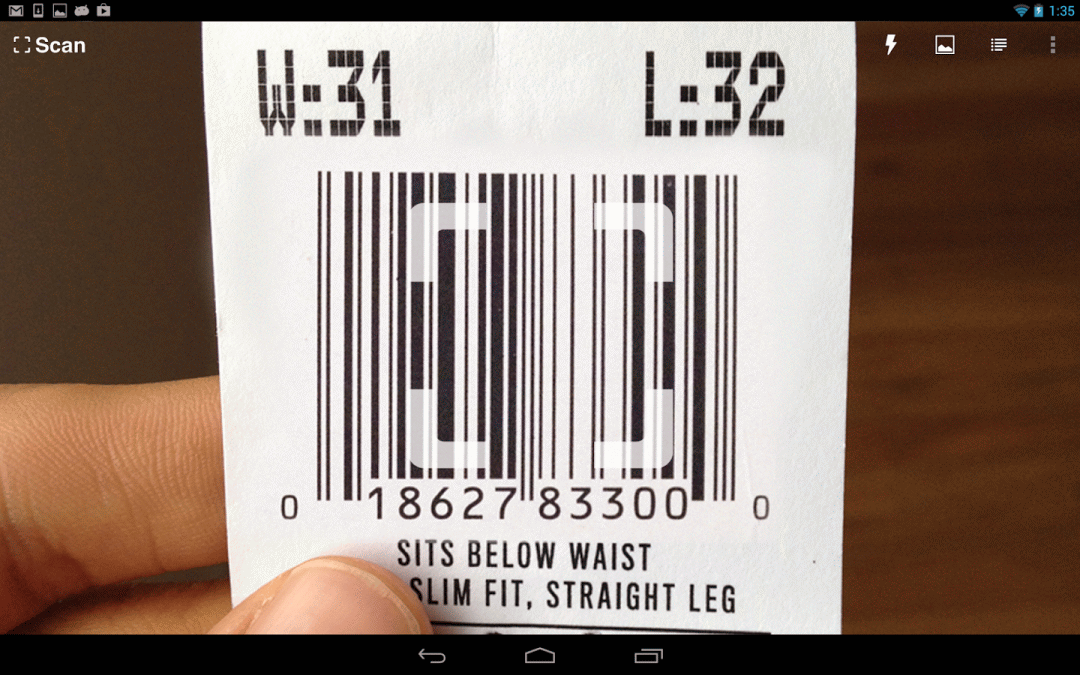
To scan a QR code or barcode simply open the app, point the camera at the code, and you’re done! There is no need to take a photo or press a button. Scan will automatically recognize any code your camera is pointing at.
When scanning a QR code, if the code contains a website URL, you will automatically be taken to the site. If the code just contains text, you'll immediately see it. For other formats such as phone numbers, email addresses, or contact info, you will be prompted to take the appropriate action. PRODUCT BARCODES
Scan recognizes all of the popular barcode types (UPC, EAN, and ISBN) and shows you pricing, reviews, and more about any products you scan. Barcode scanning requires a newer device in order to work reliably. Cameras on older devices do not provide the resolution or focus required for barcode scanning. ADDITIONAL FEATURES
• View a history list and map of all of your past scans
• Sync your scan history across the web and all of your devices
• Toggle your front or rear camera for scanning
• Set a default browser to open websites in
• Scan pictures of QR codes and barcodes from your camera roll
• A switch to turn on your device’s light (if it has one) for scanning in low-light circumstances DEDICATED TO PERFECTION
Our goal is to make our app the best scanning app in the store. We can’t do this without you. We are dedicated to your satisfaction and need to hear feedback from you. If you have an issue with Scan, please do not write a review of the app saying "it didn't work." This does not help us make things better for you. Instead, please contact us at support@scan.me or on Twitter @scan and we'll do our best to help.

REVIEWS
“Quick and very reliable. I’d give it six stars if it were possible.”
“No ads, beautiful design, and even caught blurry QR codes I didn’t expect it to scan”
“I’ve saved over $80 by scanning products in the store and finding them cheaper online”
MAKE YOUR OWN QR CODES ON SCAN.ME
Want to make your own QR codes for others to scan? Visit our site at http://scan.me to create and manage your own QR codes for free. UPDATE:
Recently released a new Wi-Fi QR code type on the site. These new Wi-Fi QR codes allow visitors to your home or business scan a QR code to get easy access to your wireless network.

REQUIREMENTS
In order to use Scan, your device must have a built-in camera. When scanning codes that redirect to online content, such as websites, you will need Internet connectivity. And a minimum Android 2.3.3+

DOWNLOAD
SCAN 2.2.1
[FROZENSOFT-DL - 3.13 MB]
RECOMMENDED FOR TORRENT USERS
[MAGNET LINK - 3.13 MB]
.
[DROPBOX - 3.13 MB]
RECOMMENDED

Posted By Unknown 9/29/2014

Tuesday, September 2, 2014

CamScanner -Phone PDF Creator


The world’s No. 1 mobile document scanning and sharing today
* Installed on over 60 million devices in over 200 countries around the world
* Over 50,000 new registrations per day
* CamScanner, 50 Best Apps, 2013 Edition – TIME
* Top Developer – Google Play Store

CamScanner helps you scan, store, sync and collaborate on various contents across smartphones, iPads, tablets and computers.

FEATURES
QUICKLY DIGITIZE DOCUMENT
Just use your phone camera to scan and digitize all kinds of paper documents: receipts, notes, invoices, whiteboard discussions, business cards, certificates, etc

OPTIMIZE SCAN QUALITY
Smart cropping and auto enhancing ensures the texts and graphics in scanned documents are clear and sharp with premium colors and resolutions

EXTRACT TEXT FROM IMAGE
OCR (optical character recognition) feature recognizes texts in document images and extract them from images for later searching, editing or sharing. (Paid app only)

SHARE PDF/JPEG FILES
Easily share documents in PDF or JPEG format with friends via various ways: post on social media, send attachment or document download link through email

AIRPRINT & FAX DOCUMENTS
Instantly print out any documents in CamScanner with nearby printer via AirPrint; directly select document and fax to over 30 countries from the app

LICENSE COLLABORATE ON DOCUMENTS
Want to get feedback on your documents? Invite friends or colleagues to collaborate on documents. They can view, comment and exchange ideas on documents in groups

ADVANCED DOCUMENT EDITING

Make annotations on documents with a full set of editing tools. Also adding customized watermarks are made available to mark your own documents

LICENSE QUICK SEARCH
When you have plenty of documents, you can use Tags to categorize and easily find them. In addition, OCR for Search helps you find texts inside image and notes. Just enter one keyword, you can quickly find the document you want. 

SECURE IMPORTANT DOCUMENTS
If you want to protect confidential contents, you can set passcode for viewing important documents; also, while sending document download link, you can set password to protect others from seeing it

LICENSE SYNC ACROSS PLATFORMS
Sign up to sync documents on the go. Just sign in to any smartphone, tablet or computer (visit www.camscannert.net) you own and you can view, edit and share any document

PREMIUM SUBSCRIPTION SERVICES
  1. Edit OCR results and notes of the entire doc, exporting as .txt file
  2. Create Doc Collage for multiple pages
  3. Add 10G cloud space
  4. Add 40 extra collaborators
  5. Send doc link with password protection and expiration date
  6. Auto upload docs to Box, Google Drive, Dropbox , Evernote and OneDrive
  7. Batch download PDF files in web app (www.camscanner.com)
  8. Every benefit registrants enjoys
  9. Everything paid app offers
Payment models for Premium subscription:
  • $ 4.99/month
  • $49.99/year
Please note the subscription is automatically renewed at the end of the period unless you choose to cancel the subscription
CAMSCANNER USERS SCAN AND MANAGE
Bill, Invoice, Contract, Tax Roll, Business Card…
Whiteboard, Memo, Script, Letter…
Blackboard, Note, PPT, Book, Article…
Credential, Certificate, Identity Documents…

THIRD-PARTY CLOUD STORAGE SERVICES SUPPORT
Box, Google Drive, Evernote, Dropbox, OneDrive

WHAT'S NEW
v3.5.0.20140730
1. We made Premium features “Edit OCR results of any doc’s single page and export as .txt file” available to paid app users
2. We made Paid app features “Add unlimited annotations” available to free app users
3. Create doc collage to display multiple docs in one page (Premium only)
4. Options to auto upload docs to Google Drive, Dropbox, Box, Evernote, and OneDrive (Premium only)
5. Set doc link expiration date when sending it to others (Premium only)
6. Reorganized the Settings options

REQUIREMENTS: Android 2.3+

DOWNLOAD
CAMSCANNER PHONE PDF CREATOR PATCHED v3.5.0.20140730
[GOOGLE DRIVE - 8.53 MB]

[MIRRORCREATOR - 8.53 MB]

Posted By Unknown 9/02/2014

Saturday, May 3, 2014

AppNana - Free Gift Card Rewards

SCREENSHOTS


The most popular mobile reward app from iOS is now available on Android!!

Try free apps and redeem any gift card for free! Members earned over $5 Million in games and gift card credits.

For iOS device, go to APPNANA.COM your device's Safari to access more offers and rewards

FEATURES
* Download free apps from Nana Offers to earn Nanas.
* Receive Nana points and redeem them for gift cards.
* Get 400 daily points just by coming back every day!

You must OPEN the apps after installing them

Note: Please input your email correctly in order for us to send the rewards to your inbox. It will take up to 48 hours for us to send the gift code to your inbox

Please invite me, F3287735
(You'll need at least 15K nanas to do invite)

DOWNLOAD
AppNana
iOS
Open your Safari browser on your iPhone, iPad or iPod Touch and visit 
www.appnana.com

Android (PlayStore)

Posted By Unknown 5/03/2014

Tuesday, February 18, 2014

AppLock (HI App Lock) (+PRO Unlocker)

HI APPLOCK
App Locker for Android


HI AppLock is an app locker and privacy protect tool. It locks any app, such as SMS, Facebook, Whatsapp, SnapChat, Instagram, Gallery, Gmail etc. You can also protect your privacy with password. More easy, powerful and reliable then other applock, and it has NO ADS

USE CASES
WITH THE PROTECTION OF HI APPLOCK, YOU MAY:
1. Prevent your sensitive/personal info from unwanted eyes
2. Prevent your kids from changing phone's settings, paying game, messing up it
3. Prevent your phone from being installed useless, even Monitor/Supervisory app
4. Never worry about a friend/workmate get your phone to have a look, play games again!
5. Never worry about privacy info in some app may be read by someone again!

FEATURES
1. Lock any app: Such as SMS, Contact, Gmail, Facebook, Whatsapp, Google+ etc with password (pin lock or pattern lock), secure your privacy
2. Re lock policy: Every time, Until screen off, 1/3/5 minutes
3. Multi lock feature: Different lock may have different password (Only HI AppLock have multi lock feature on market)
4. Auto lock base on Time or WiFi (auto tasker) feature
5. Disguise feature: Disguise as a Calculator 
6. Theme support: Theme password screen; iOS 7 theme,iOS 7 gold theme, iPhone 5s theme, dark theme
7. Widget for quick lock and unlock 
8. Quick lock switcher on status bar
9. Can prevent app from being uninstall (Lock Settings, Google Play Store, Installer/Uninstaller)
10. Can lock incoming or outgoing calls 
11. Lock screen: can lock entire screen
12. HI AppLock can be add to device admin, prevent from being uninstall
13. HI AppLock can auto restart when being killed by task killers, reliable to protect your privacy
14. Little memory footprint and power-saving
15. Fake Error Message
16. Random keyboard
17. Hide HI Applock icon from launcher
18. Lock phone plugin: Anti theft
19. Pic lock plugin: Lock and vault gallery picture photo or video safely and easily
20. Facebook lock plugin, WhatsApp lock plugin, Line lock plugin
All in one, best applock, can be an app locker, app protector, app safety to lock and hide app for privacy protector, privacy security

TIPS
1. Enable Notification to prevent Hi Applock from being killed by system or task manager
2. Enable "Add to device admin" to prevent HI Applock from being uninstalled
3. More tips please refer to Hi App lock Setting ► About ► Help

WHAT'S NEW (v2.92)
Optimize lock screen feature: Get rid of the tough setting; Fix bugs of double press HOME can not go to default home screen
Add Japanese,Spanish,French translation; Update for Russian translation.
Optimize Theme store, add flag for HOT and NEW themes
Fix most reported Force Close bugs

DOWNLOAD
HI APPLOCK 2.92 + PRO UNLOCKER
SHAREBEAST - 1.41 MB

.
GOOGLE DRIVE - 1.41 MB
FILE NAME IS RANDOM LETTERS. PLEASE ADD EXTENSION *.RAR BEHIND IT

Posted By Unknown 2/18/2014

Pixlr Express

Pixlr Express is a fun and powerful photo edit that lets you quickly crop, resize, and fine-tune any picture, all in a completely ad-free experience. Choose from over 2 million combinations of free effects, overlays, and borders to further personalize your image. Pixlr Express makes you look like a pro, even if you’ve never edited a photo before.


FEATURES
• Easily crop, rotate, and re-size images when saving and sharing. 
• Create and customize a photo collage by editing its layout, background, and spacing. 
• Share your photo directly with friends through Facebook or email, or just save it back to your photo library.
• ‘Auto Fix’ photos for a one-click fix to balance out colors, adjusting for poor lighting conditions.
• Remove red-eye and whiten teeth with simple tools.
• Make your photo look like a drawing or sketch with stylize adjustments such as halftone, watercolor, and pencil.
• Explore the growing catalog of additional effects, overlays, and border packs.
• Overlays help adjust the mood of the photo – amplify the tone, cool it down, or add surreal shades.
• Lighting effects can add drama, sparkle, or a grunge look. Easily adjust the intensity and orientation of each effect. 
• Finish off your editing process with the right border – pick a style that fits you.
• Look like a pro with cool photo effects such as focal blur, denoise, and more. 
• Explore cool tools: easily adjust the contrast and brightness of your image, or focus on one color with the color splash tool.
• Keep track of your favorite effects and overlays with the favorites button.

CHANGELOG
Version 2.2.1
✓ Bug Fixes

Version 2.2
✓ New STYLIZE Adjustments for creative effects
✓ Bug Fixes

Version 2.0.1
✓ Bug Fixes

Version 2.0
✓ Refreshed user interface
✓ Create Photo Collage
✓ Add Image feature
✓ "Fresh" image button (most recent photo taken)
✓ Draw on your images with “Doodle”

REQUIRES: Android +2.2

DOWNLOAD
PLAYSTORE - 6.9 MB

Posted By Unknown 2/18/2014

Tuesday, January 7, 2014

SpeedView PRO 3.2.0

SpeedView is an advanced speedometer application that uses the phone's built-in GPS system to show your current, maximum and average speed, as well as the direction, total distance, and time traveled. Suitable for running, car driving, biking, or hiking

REVIEW


SCREENSHOTS
MAIN SCREEN (HYBRID)              MAIN SCREEN (DIGITAL)
 
 
COMPASS                                      ADVANCED

• HIGH ACCURACY
GPS-based speedometer that is more accurate than the one in your car

• LINEAR COMPASS
Shows your current direction of travel. A compass mode is also available

• HUD MODE
Mirrors the numbers so you can place your phone on your car's dashboard and see the speed reflected in the front glass

• SPEED GRAPH
Displays a graph chart covering the last several minutes

• SPEED WARNING
You can set the speed limits for three different types of roads so that when you go too fast a visual alert or sound will notify you

• DISPLAY UNITS
Supports units such as miles, kilometers, and nautical miles

• GPX TRACK EXPORT
Enables you to save your current track to the SD card or email it to someone. The GPX format is supported by Google Earth and many other programs: http://www.topografix.com/gpx_resources.asp

• BACKGROUND MODE
You can minimize the program and keep it running in the background. It will work as usual and even notify you when you exceed the speed limit.
Please note that the accuracy of GPS measurements is affected by a number of factors including atmospheric conditions, obstructions and the visibility of satellites


DOWNLOAD
SPEEDVIEW PRO 3.2.0
MIRRORCREATOR - 1.32 MB

Posted By Unknown 1/07/2014

 
Claim Free Satoshis Now!