Accessible with bit.ly/frozen-soft and thanks for visiting | Please don't skip onto the direct link, whereupon use the ADF.LY/J.GS links, that really helps and means a lot to me | If you're using Chrome Browser, you can type frozen-soft.blogspot.com then press SPACE to search


Thursday, December 12, 2013

8GadgetPack for Windows 8

8GadgetPack is an utility that installs the original Gadgets which is available on Windows 7 and Vista. Now you can enjoy these Gadgets again on Windows 8 / 8.1.

CHANGELOG
2013/08/22: Version 8.0 released.
Fixed a bug that prevented to start all gadgets at startup. The crash on startup should happen way less often now. Also fixed a bug that prevented the installation of 3rd party gadgets when the temp directory was not on the systemdrive. Added a few gadgets and updated the outdated ones.

2013/07/22: Version 7.0 released.
Added Windows 8.1 compatibility. All gadget settings will remain during the update to 8.1 if you install this version. The new Internet Explorer in 8.1 is really buggy in combination with gadgets. It was really a lot of work to workaround that, so I hope you appreciate this. If you have a high DPI setting the gadgets will look smaller on Windows 8.1.
2013/05/05: Version 6.0 released.
I hopefully fixed a bug that caused the gadgets to crash at startup or prevented gadgets to show up. Also made autostart more stable. Fixed a bug that prevented flash gadgets to work. Updated outdated gadgets and added a few. Added silent install support (see FAQ).
2013/01/20: Version 5.0 released.
Resolved a bug preventing the gadgets to start. Updated a lot of gadgets and added a few. Improved install time and installer compression. Changed the weather gadget that appears on first start-up to WeatherCenter
2012/11/13: Version 4.0 released.
Resolved an error message preventing to install when an uninstall previously went wrong. Added several gadgets and updated a few. New users will get a message now that the sidebar is closable and that gadgets still can be moved to the desktop.
2012/10/29: Version 3.0 released.
Resolved an error message appearing when opening event viewer. Fixed a bug preventing the installer to work when windows is not installed on C:.
2012/08/30: Version 2.0 released.
Added 30 languages. Basically every major language is supported now. The Microsoft gadgets support only 6 languages (Chinese (simplified), English, French, German, Japanese, Russian) though, but they will fall back to English, so you can still use them. Contact me if you want a specific language added.
2012/08/23: Version 1.0 released.

FAQ'S
Q: I want to upgrade / already upgraded to Windows 8.1. Will 8GadgetPack still work after the upgrade?
A: If you have Version 7 or later installed, yes. If not you should update 8Gadgetpack to the current version. Simply download the installer and run it. No need to uninstall first. You can also do this after you have upgraded to Windows 8.1. All gadget settings should remain.
You should note though that Windows 8.1 introduced a bug that prevents gadgets to work if you have a high dpi setting enabled. I enabled a workaround in 8Gadgetpack to disable DPI scaling for Gadgets in Windows 8.1. So the gadgets keep working, but depending on your DPI scaling they might look smaller than they did on Windows 8. Microsoft probably won't fix this, but I keep trying to make a better workaround.

Q: Is it free?
A: Yes, completely

Q: I didn't really use gadgets previously. Is it really worth installing these?
A: You should try it. The gadgets included are really useful when working with the PC. Unlike Metro-Apps gadgets can access useful system-information. The included Clipboard-Manager gadget for example will highly improve your productivity. With the Sidebar gadget, you can make the gadgets visible while working with maximized windows. Monitoring network traffic, setting the volume with one click and having an analog clock visible all the time are things you don't want to give up once you get used to it.

Q: What are the requirements?
A: This is supported on all versions of Windows 8, except Windows RT and the beta of Windows 8 (the beta still contains gadgets). Administrative rights are required to install.

Q: Why is there a sidebar? Windows 7 didn't have one.
A: This is actually just a gadget to help you keeping the gadgets organized and visible. You can right-click on it and select "close sidebar" to do so. The gadgets can still be moved onto the desktop as you like. Or you can even add more sidebars by adding the gadget "7 Sidebar". This is especially useful when working with multiple monitors. You can also make the sidebar appear automatically when touching the border and customize its design.

Q: Will 8GadgetPack install some crap on my PC?
A: No, the installer will only install the original Microsoft files and set the neccessary registry entries to make the gadgets work again. The only addition is a small tool which allows you to uninstall all Non-Microsoft gadgets and delete all gadget settings. There is also an uninstaller included which removes everything the installer added. I could make quite some money by adding adware to the installer, but I'm sure you appreciate it that this installer is clean.

Q: Aren't gadgets unsafe? Afterall, Microsoft removed them for a reason?
A: Gadgets can contain viruses like any other software. Despite the warning when installing a gadget people seemed to think that it is safe to run any gadget. As long as you trust the source of the gadgets you install and you use anti-virus software you should be safe.

Q: Will I be able to install gadgets other than the ones included?
A: Yes, the installer will make it possible to open and install .gadget files made for Windows Vista or Windows 7. But be careful, gadgets can contain, just like other programs, viruses or trojans.

Q: When I try to install, there appears some error message.
A: First, try to download the installer again and check if the error still appears. If that's not helping contact me and don't forget to mention the error message.

Q: I already installed an older version of 8GadgetPack. What do I have to do to upgrade?
A: Simply download the installer again and open it. It will update your installation and even update outdated gadgets automatically. You don't have to uninstall first. All gadget settings will remain.

Q: A gadget seems not to be working. What can I do?
A: The best choice is to contact the author of the gadget. I cannot do much about it (unless I made the gadget), I just ship the original gadgets files to make gadgets working under Windows 8. If it is a Microsoft gadget that does not work you are out of luck. They didn't just discontinue gadgets but also seem to shut down the servers required by the weather, currency and stocks gadget. There are a bunch of alternative weather gadgets included in the pack and dozens of such gadgets can be found on the internet.

Q: Is there a way to do a silent install?
A: Yes. First download the installer and save it unter C:. Open a Command Promt as Admin (Right-click in bottom left corner and select it). Then type the following:
msiexec.exe /i "C:\8GadgetPackSetup.msi" /qn /norestart
You can close the Command Promt then. After a while the gadgets option will appear in the desktop right-click menu.
If you want to get notified when the installer finishes replace /qn with /qb. The installer will enable gadgets for every user on the computer, but they won't appear until the user selects Gadgets in the desktop right-click menu or in the Startmenu.

Q: I have a gadget that requires the 32-bit version of the sidebar. What do I do?
A: The installer does install both the 32 and 64-bit version of sidebar.exe on 64-bit Windows. You simply need to run C:\Program Files (x86)\Windows Sidebar\sidebar.exe to run the 32-bit version.

Q: Sometimes on startup, there appears the error "sidebar.exe has stopped working". What to do?
A: This is a bug that has been reported to me by many users, but that I sadly cannot reproduce. So I'm afraid you just have to live with it.

Q: Is it possible to put the sidebar on top or bottom?


A: No, sorry. It is often requested, but an implementation would have many problems.

DOWNLOAD
8GadgetPack v8.0 (17.3 MB)

Posted By Unknown 12/12/2013

Thursday, November 21, 2013

Acronis True Image 2014 v17.0 Build 6614 PREMIUM

Backup your data, and restore or transfer it to any PC hardware quickly and easily, no matter what the make, model or installed components of your computer. High-end backup, file restoration, and PC migration technologies, 5GB of free online storage, support of nearly all known backup media. Acronis True Image 2014 PREMIUM is the ultimate for your data protection.

DISK IMAGING
Backup and restore the exact configuration of your PC, including your operating system, settings, applications, and all your files. Save everything to a removable hard drive, CD/DVD, USB drive, NAS device, or even Acronis cloud storage. *NEW Online Disk Imaging

NEW INCREMENTAL AND DIFFERENTIAL BACKUPS
Backup locally and to the cloud, without the need to run a new full-system backup every time. After an initial image backup, incremental and differential backups capture only changes since your last backup to save time and storage space.

NEW FREE ONLINE STORAGE
Start off with your own piece of the cloud. We give you 5GB of FREE, ultra-secure cloud storage for one year. Customize access rights and rules then use it to backup, sync, share, or store your critical files and folders.

NONSTOP PC BACKUP
Revisit any file, folder, or your entire system at a specific point in time – True Image records on-going changes as you work so your backups are always up to date.

TIME EXPLORER
Get a preview of what your system looked like at each backup and go back in time to choose the version you want to restore.

AUTO FILE SYNC
Fast, secure, simple – the files you choose are automatically pushed to all your devices running True Image 2014 or the free mobile apps for Android and iOS.

MOBILE FILE ACCESS
Get your files on all your devices. Our iOS and Android mobile apps are available for free.

SMART SCEDULING
Your PC backups run automatically when you want them to, even when you aren’t using your computer.

SET AND FORGET
You choose when and how frequently True Image 2014 backs up your computer. We handle the rest.

BACKGROUND OPERATION
Keep working: True Image 2014 runs in the background and doesn’t affect any other applications or processes.

EXTREME MEDIA VERSATILITY
Backup to DVDs, USB keys, external hard drives, network-attached storage (NAS), GPT drives, or cloud storage.

SIMPLE NETWORK BACKUP
True Image 2014 automatically detects your NAS device so you can backup your networked PCs to a safe, central storage site.

NEW FLEXIBLE FILE RECOVERY
Restore your entire system from a disk image saved locally or in your cloud storage space, or just recover the individual files you need.

PERSONAL KEY ENCRYPTION
Keep your data safe and sound with robust government-grade 256-bit AES encryption.

TRY&DECIDE
Install any software, browse any websites with confidence – with Try&Decide technology, you decide if you want to keep any changes to your computer.

SECURE ZONE®
Store a disk image backup on your PC system drive. Recover on the fly, even if your operating system has failed.

2+ TB DRIVES
Protect over 2 terabytes of files, programs, data, and any other content.

NEW WINDOWS 8 SUPPORT
True Image 2014 is fully certified for Windows 8 so it’s ready to go on all the latest PCs. In fact, True Image 2014 works perfectly on all Windows operating systems from Windows XP onward.

SYSTEM REQUIREMENTS
Storage Media
  • Hard Disk Drives
  • Network Attached Storage (NAS)
  • FTP Server
  • CD-R/RW, DVD-R/RW, DVD+R/RW, BD-R
  • PATA (IDE), SATA, SCSI, SAS, IEEE1394 (Firewire), USB1.1/2.0/3.0 drives
Supported Operating Systems
  • Windows 8 all Editions
  • Windows 7 all Editions SP1
  • Windows Vista all Editions SP2
  • Windows XP Home Edition SP3
  • Windows XP Professional (X32 SP3/X64 SP2)
  • Windows Home Server 2011
Supported File Systems
  • FAT16/32, NTFS
  • Raw Image support
DOWNLOAD
Acronis True Image 2014 v17.0 Build 6614 PREMIUM 
MAGNETLINK - (278.5 MB)

Posted By Unknown 11/21/2013

1Click DVD Copy PRO 5.5.9.0

1CLICK DVD COPY PRO is a fast, easy-to-use, full featured program for copying DVD movies onto DVD discs. The latest version now incorporates CPRx technology to ensure the highest level of success copying the latest generation of DVD movies.

You now have complete control over the final copy. Use the Copy Presets; or the more advanced features to select what content will be copied and how much compression will be used. With 1CLICK DVD COPY - PRO, you can make a perfect copy with just one click.

KEY FEATURES
  • Windows 8 Compatible
  • CPRx technology for copying new DVD movies
  • Copy Presets - One click preset for each type of DVD copy
  • Preview the movie, extras and menus
  • Include or exclude movie and menus based on preview
  • Select individual audio, video, and subtitles streams
  • Control the amount of video compression used
  • Make additional backup copies without re-copying the DVD
  • Copy Episodic DVD Movies, TV Series, etc
  • Copy a movie to your hard drive - great for laptops
  • Supports copying of Multi-Channel Audio (Dolby Digital 5.1, DTS)
  • Supports both NTSC and PAL DVD movies
  • Supports Dual Layer media
  • Free software updates for a year
  • Free technical support
SYSTEM REQUIREMENTS

  • Windows 8, 7, Windows Vista, or Windows XP (SP2 or greater)
  • Up to 9 GB available hard disc space for DVD images and temporary DVD files
  • DVD reader (DVD writer required for burning DVDs)
DOWNLOAD
MAGNET LINK (3.52 MB)

Posted By Unknown 11/21/2013

Sunday, October 20, 2013

Bump, a Mobile Contact Sharing App, is now Acquired by Google

Label:


After raising nearly $20 million and becoming one of the most downloaded mobile apps but failing to find real revenue, Bump Technologies has been acquired by Google. Its namesake app Bump lets you physically tap phones together to share contact info and more, and it will stay open for download. Congratulations might not be the right word, but Bump could have a bright future at the Googleplex.

Bump’s David Lieb writes “We strive to create experiences that feel like magic, enabled behind the scene with innovations in math, data processing, and algorithms. So we couldn’t be more thrilled to join Google.” It appears that the whole 25-person team including Lieb and fellow co-founder Andy Huibers will be coming aboard at the search giant.

Bump and the collaborative photo sharing app called Flock it released last year “will continue to work as they always have for now; stay tuned for future updates.” The blog post doesn’t mention what will happen to the Bump Pay app the startup built on top of PayPal that lets users make peer-to-peer mobile payments by knocking fists.

Terms of the acquisition weren’t disclosed, so it’s hard to tell exactly how strong of an exit this was for Bump and its investors, which include Y Combinator, Sequoia Captial, Felicis Ventures, SV Angel, Andreessen Horowitz, and many angels.

[Update: Sources familiar with the deal say the acquisition was definitely not a home run for Bump, but that it was no acquihire either as we suspected. They didn't specify an exact sale price but pegged the deal in the ballpark of $35 million. That would be modest premium on Bump's $19.9 million in funding but not a glowing multiple VC would want to brag to their LPs about.]

Bump gained huge popularity by being an early App Store hit. Instead of having to clumsily type out a new friend or professional colleague’s contact information, you and someone else could both open Bump, bump fists together while holding your phones, and the contact info, photos, audio, video, or other selected files would be shared between you instantly. As of March it had hit 1 billion photos shared and 125 million downloads, up from 100 million in August.

With time, though, other ways to quickly share contact information emerged. Meanwhile, Bump remained free and wasn’t earning any meaningful revenue so paying its strong mobile engineering team may have burned through the $16.5 million round led by Andreessen that the startup raised in November 2011.

Then Apple dropped a bomb on Bump. It announced a new feature called AirDrop for iOS 7 that would make sharing files between nearby phone a native feature. That could have curtailed Bump’s steady growth. It was time for Bump to throw in the towel.

Based on these factors, the acquisition may have been more lucrative than a basic acquihire, but not big enough to be considered a home run.

From one perspective, the sale might be considered a failure. Bump could have minted if it found a way to monetize its huge user base, but couldn’t find a way to go it alone and so instead folded into a tech giant. From a different perspective, Bump’s soft landing could be said to have kept investors from losing money while giving its team an opportunity for greater impact thanks to Google’s resources.

What may have interested Google actually isn’t Bump itself, but Flock. The app uses geolocation to determine which of your Facebook friends you’re nearby, and then offers to create a collaborative photo album with them that includes all the shots any of you took at that party, concert, or day in the park. The idea is that your friends might not broadcast all those photos to social media, but you’d still want to see them as you all shared the experience together. The Flock design philosophy was to strip as much out of the photo sharing process as possible to make it seem almost automatic.

Google might look to turn Flock into a part of Google+ as a way to simultaneously compete with Facebook’s photo sharing and Dropbox’s photo saving services. Google+’s Party Mode was a pioneer in collaborative photo sharing centered around events, but the late-comer social network has still failed to gain serious engagement. Facebook recently launched shared albums, making it more dire for Google to get deeper into the space.

The acquisition also scores Google a trove of mobile communication patents that it could use to help nearby devices sync up. These include an app noticing that sensors on two devices share similar readings to determine that they’re in proximity. Google could use these patents to improve Android and create richer alternatives to near-field communication (NFC).

With Bump and Flock’s features combined with Google’s built in-audience, the ideals of “irreducible” design the startup embodied could make a bigger impact without having to generate revenue directly.

SOURCE: TechCrunch.com

Posted By Unknown 10/20/2013

Friday, October 18, 2013

Windows 8.1 Pro / Enterprise (Final)

Label:

Microsoft released their final Windows 8.1. Update your Windows now!

Posted By Unknown 10/18/2013

Wednesday, October 16, 2013

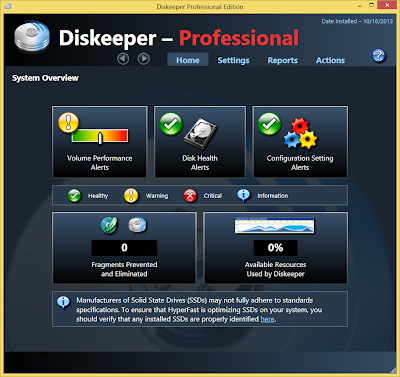
Diskeeper 16.0.1017 PRO


Whereas typical defragmentation utilities consume system resources to operate and perform defrag after the performance penalty has already been incurred, Diskeeper is the only proactive solution that solves the problem in real-time while running transparently in the background. When a computer is new, data can be saved and accessed quickly. But as time goes on and more applications and files are written and deleted, files end up being scattered around a volume and require far more I/O operations for every write and subsequent read. Diskeeper’s IntelliWrite technology prevents this from occurring so files are always written and accessed in a sequential manner, which reduces seek time and the number of I/Os required to write a file or access it.

WHY USE DISKEEPER PROFESSIONAL?
  • Proactively eliminates performance robbing fragmentation
  • Eliminates the need to schedule disk maintenance during off-hours
  • Easily deploys to hundreds of PCs via a central management console
  • Operates with true “Set It and Forget It” functionality
  • Extends the life of corporate laptops and workstations
  • Dramatically improves boot-up time
  • Eliminates application bottlenecks and increases business productivity
  • Continuously optimizes without hampering system resources
PRODUCT COMPARISON

Windows®
Built-In
Defrag Tool
Professional
$64.95
Buy Now

Server
$374.95
Buy Now
TECHNOLOGY

PERFORMANCE
Medium
To High
Zero
Overhead
Zero
Overhead
SPECIAL FEATURES
Limited
N/A
Unlimited
Unlimited
PRODUCT MANAGEMENT
NETWORK MANAGEMENT
N/A
N/A
Admin Edition
Admin Edition
Admin Edition
Admin Edition
N/A
Admin Edition
Admin Edition

FEATURES

For IT professionals who need to deploy Diskeeper across a fleet of laptops or workstations, the Diskeeper Administration console enables seamless network deployment. For corporate PCs and laptops, Diskeeper Professional is the only highly efficient, proactive, Set It and Forget It® software for maximum performance—making it the #1 utility for keeping Windows systems running like new.


IntelliWrite® I/O Optimization Technology

IntelliWrite fragmentation prevention technology actively prevents up to 85% of file fragmentation before it can occur with zero resource overhead by optimizing file writes.

InvisiTasking®Intelligent Monitoring Technology
Allows all background operations within the system to run with zero resource impact on current activities.

HyperBoot® File Access Technology
Strategically moves files into a sequential order that minimizes the number of I/O requests during the boot process.

HyperFast® SSD Optimizer Technology
Produces faster performance in solid state drives running on Microsoft operating systems. The HyperFast feature includes TRIM functionality and is enabled only if a solid-state drive is recognized.

Instant Defrag Engine
Immediately defrags newly fragmented files before they can slow performance. Instant Defrag is an engine that consolidates any fragments that were not prevented by IntelliWrite, instantaneously without the need to analyze the drive.

Disk Health Monitoring
Monitors SMART disk data, checks for critical file system problems, warns of critical problems or an imminent disk failure, generates alerts by e-mail or text messages for 24/7 monitoring.

System Monitoring
Monitors system environment activities and provides a summary of the statistical data gathered for system performance monitoring.

Terabyte Volume Engine® Technology
Engineered to rapidly defragment volumes with hundreds of thousands of files.

Efficient Mode
In addition to an extensive defrag mode, Efficient Mode offers the greatest net gain in system I/O resource savings ever available. It immediately targets and eliminates only fragmentation that directly affects system performance.

Free Space Consolidation Engine
Swiftly consolidates free space and tightly integrates with Instant Defrag to handle new fragmentation as soon as it is created.

Performance Map
Performance Map gives a quick "at-a-glance" indication of file access performance for each volume.

Enhanced Analysis Reports
Rich reporting functionality that displays health and performance gains for the system. Reports include: Fragmentation Analysis, Read and Write Access Time Improvement, File and Free Space Performance, and Disk Access I/Os Saved.

BOOT-TIME MODE
Safely performs Microsoft® recommended defragmentation of critical system files.

Network Management Support
Easily manage Diskeeper settings and functionality across the network through the Diskeeper Administrator edition or Group Policy.

INSTALLATION
1. Run Diskeeper.exe and it'll extracting (If there's a prompt, click Yes or Run Anyway)

2. Click Next > I accept the terms ... > Next

3. Tick I Purchased the software but...

4. Tick Additional Options if License file cannot be found and click Next

5. Tick I cannot find the License File ... and click Next

6. Tick Enable Automatic Defragmentation for background auto-defrag. Untick for disabled. Click Next

7. Tick Disable System Monitoring and I confirm my setting for System Monitoring. Click Next

8. Choose the location for the installation. If you want the desktop shortcut, tick Create Desktop Shortcut for Diskeeper. Click Next

9. Install. (Any prompt, click Yes)

10. Untick Launch Diskeeper and click Finish

11. Copy Diskeeper12 from Crack folder (x86 for 32 Bit or x64 for 64 Bit) to your Diskeeper install location. Replace it.

DOWNLOAD
MAGNETLINK - (52.7 MB)
32Bit & 64Bit

Posted By Unknown 10/16/2013

 
Claim Free Satoshis Now!